Showing posts with label Filmmaker. Show all posts

Wednesday, September 18, 2013

Why I'm switching to Canon

My first DSLR was a Nikon d3000 that I got as a christmas.  I considered myself a Nikon fan boy and tried to be loyal to my brand.  As the d5100 came out, I pouched and purchased one with its ability to record video.   At an amateur level with limited experiance, I was thoroughly impressed.  But having my hands on it for a couple years, and being considered a 'professional' videographer, faults are appearing.  My two grievous with the Nikon d5100 are:


  1. When you enter live view to record a movie, you can adjust the aperture but the camera will ignore it. Take a shot at F8 and then enter live view, set aperture to F1.4 and hit record – the manual states it should record at F1.4, the screen is telling you “F1.4″ and yet the movie is being shot at F8!
  2. Critically shutter speed and ISO are controlled automatically by the camera in live view and movie mode, although pressing and holding AEL for the duration of the shot prevents them from changing. Yes shutter and ISO are adhered to in live view mode, just not by the display or movie. For example you can set ISO 100 and 1/30 and hold AEL whilst hitting the record button but it’s awkward and means you have to have your hand on the camera even when recording.

You can 'fix' the non manual movie mode by setting the AE lock, but it sit tries to compensate slightly.  But more importantly, by investing in a Nikon body I shouldn't have to fix an issue.  It shows that Nikon's focus is on Photographers and as a still camera the d5100 is great, but it appears Canon invests more into DSLR Video shooters.

Luckily Nikon glass is compatible with Canon bodies with the Fotodiox Lens Mount Adapter, so I can keep my precious 35 and 50mm f/1.8s

But what body?  I'm leaning towards a T3i which I have experience with and savings some money to invest in glass, or the now outdated 60d.  Who's prices have dropped with the release of the d70.


Here's an in depth video Dave Dugdale produced comparing the two:


Let me know what you think.  T3i or 60d or something else? And if anyone is looking to buy a camera...

Tuesday, September 17, 2013

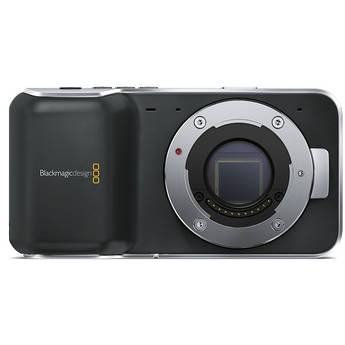
I'll pass on the Black Magic Pocket Camera

Update: Found this in depth overview of the Pocket camera.


Upon first heard of the BMPC a couple months ago.  I researched the new camera awaiting its release and two things jumped out at me. (1) It records in RAW and Apple ProRes.  That seems so cool. Having the same ability to control your video as you do a RAW photo.  Correcting overexposure, playing around with Clarity and split-toning, it sounds awesome! (2) Its the size of a large phone!  When I think Raw video, instantly I'm hit with an image of a Red Dragon or Cineflex.  But to be able to shoot 13 stops of dynamic range with something that fits in the palm of your hand, sign me up for two!
BMPC - $995

Then, I see the price - $995. Which, I guess is reasonable, but in my budget that's not going to happen.  Excluding the cameras blatant faults.  Philip Bloom posted an instagram photo of 15 batteries he used on a single day shoot. 15! 15 batteries for a day.


Cheesey Cam's reaction:


Dave Dougdale from learngdslr.com also expressed some concern about the focusing:


I really liked the comment by Mauricio Fernández on Dave's Youtube page which really sums the Pocket Camera up:

I really like the BMCC, but this one... not so sure. It has a smaller sensor, so your 50mm would be like a 100 mm, it eats up batteries and sd cards like candy, the controls are not user friendly at all, and not even a 2K or 2.7K option. So, again... why would I buy this as opposite of a... let's say... 70D?


So....

If I had $1000, what would I spend it on?

1. Canon T3i (body) - $499
2. Canon 50mm f/1.8 - $99
3. Neewer 5-in-1 reflector - $17
4. Extra Battery - $42
5. Zoom H1 - $99
6. Rode Videomic - $150
7. SD Card - $26
8. Tripod - $40
9. Fader ND Filter - $10
10. Carry Speed View Finder - $34

Total = $1016

OR

1. Canon d60 (body) - $699
2. Canon 50mm f/1.4 - $399

Total = $1098


MoVI Stablizer

Ran across this article about an amazing stabilizer.  Check out some of this footage:


The rig was designed by Freefly Systems and will come in two models, the M10 and M5. The M10, which is the rig in use in all the videos, is the larger version; it can hold up to 10 lbs of equipment and will run you $15,000 when it hits the market. The M5 will be a smaller version of the M10 that will go for half the price in order to bring the system within reach of more people’s budgets.
Petapixel.com


Now I just need $15,000...


Kamerar 23" Slider Review

I was first turned onto the Kamerar slider by DSLR Video Shooter, Caleb Pike.  The short slider come in at $99, which I thought was a deal!  I am happy with the size, as I wanted something that was easily portable. With a short slider, adding foreground elements adds a vaster to the sense of motion in the shot.


This slider is friction based, not the coveted roller bearing design.  Previously I had eyed Konova k2, which was $219, a bit out of budget.  Friction based sliders use little pads that rub up against the rail to smooth the slide.  Damaging the rail could be detrimental to the integrity of your slider.


Overall, it is pretty smooth. As this is my first interaction with a non-DIY, built slider - it seems to hold up well. It feels professional and lightweight in your hands.  Fast movement are nearly impossible, the slider preforms best with slow movements.  I started dragging a finger behind the carriage to act as drag control and for stability.


These shots in the video below were made with the d5100, with a 20% warp stabilizer added where marked.  Next time I will take off the battery grip to make the center over gravity a little lower to help with some unintentional shaking.  I also read that the locking mechanism on the side of the carriage what rubbish, but in my experience it holds up really well (no pun intended).


I will also get some rubber bumpers or something to put on the ends of the carriage to stop the extrusive thud that happens when you reach the end of the rail.


Sliders, Ball head, Quick Release Plates, Camera, etc., all  this stuff adds up weight wise.  Be sure to have a steady tripod to support a lot of weight.  I'm using the Pearstone VT-2100, and it's barely hanging on.


To pair with the slider, I also purchased the DMKFoto Heavy Duty Ball Head with Quick Release Plate for $20.  This thing is trash.  It feels solid and is heavy, which adds weight to the slider helping smooth it down, but the locking mechanism is garbage.  To re-position the camera, you unscrew the knob and have to hold the base in place while with the other hand move the ball joint.  But for $20, what do you expect.


Bottom line: Great, little, cheap slider.  Use the money you're saving and put it towards a good tripod and ball head.

Total setup = $120

Monday, September 16, 2013

Wireless Audio Recording

Wednesday, I'm going to be recording the fabulous Pamela Graham for a piece were working on that promotes The University of South Carolina Upstate's Greenville Campus, that's a mouth fool.  I already have the H1, which I talked about earlier, and  the AZDEN Omni-Directional Lavaliere.  So,  The problem is how do I attach the H1 to Pam?


Well thinks to KnopTop, my solution got a lot easier.  A Dollar Tree, generic cell phone holder with clip that the H1 can slide into.  The good thing about this particular Lav is the small cord length, which can easily be managed, instead of 20' of bird nest.


Total cost for Wireless Set-Up = ~$131


Knoptop - Budget Audio Setup